screen_share
Share your screen with remote users
public
laptop_mac
Show My PC
Launch Web Version (View Access)
Launch Web Version (View Access)
Show My Mac
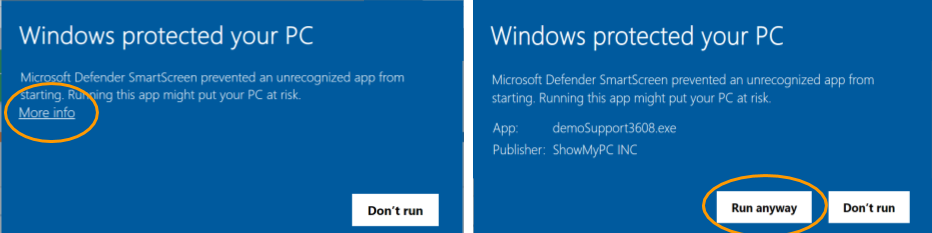
Download and Run (Support)
desktop_windows
Download and Run (Support)
Show My PC
Windows, non admin
Windows, non admin
coffee
Show My PC
Launch Java Version
Launch Java Version
support_agent
Enter the code to view remote screen
download
View PC
Windows, Download and Run
Windows, Download and Run
devices
My Unattended PCs
groups
Start or join an audio video sessionclose
event Schedule a Meeting
dialpad Get Conference Number
person_add Invite to Share Screen
apps Full Application
account_circle Login Account Settings
event
Schedule a Meeting
close
We'll email your invite with the meeting details.
dialpad
Get Conference Number
close
We'll email you a free dial-in number and access codes.
expand_moreHow do I get started?
We provide each account with a ShowMyPC subdomain, e.g. https://paysoft.showmypc.com — this page. It's where you'll find all the executables and quick links to manage your account. The URL is in your account creation email.
expand_moreHow to Show My PC to a remote user?
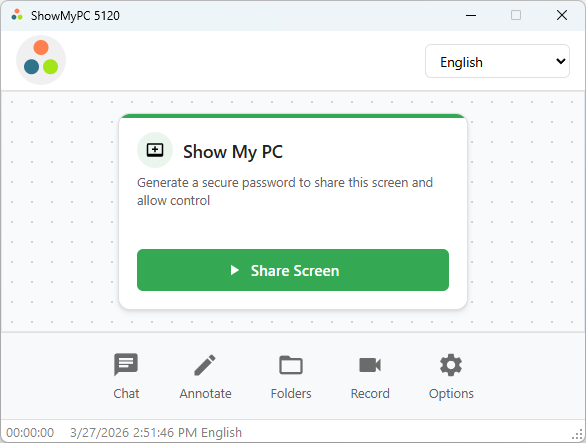
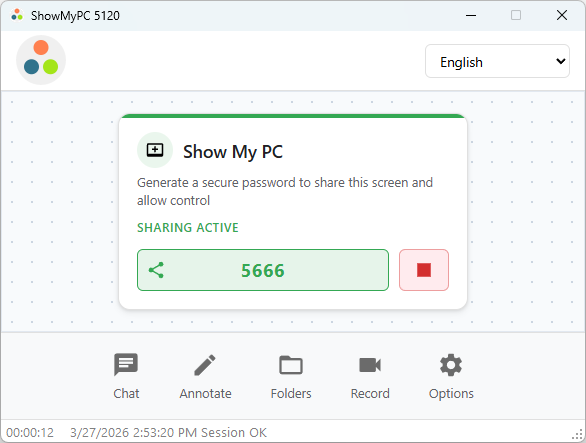
Download and run the program from your account to show your computer to remote users. After starting the program, click "Share Screen" to generate a password and share it with viewers.
expand_moreHow to View a remote user's PC?
HTML Viewer: enter the password directly on your account page to view a remote PC in the browser, no download needed.
For advanced use: launch "View PC" or "Full Application," get the password from the person sharing their screen, and connect.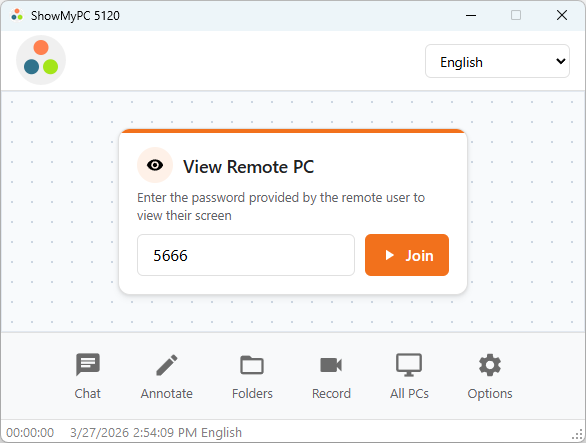
For advanced use: launch "View PC" or "Full Application," get the password from the person sharing their screen, and connect.
expand_moreHow to use Web Conference and Chat?
Open this guide in a new tab.
expand_moreHow to generate Conference Call numbers?
Go to Options > "Get Conference Number." A number is assigned to you and can be reused — it doesn't expire and is US-based. Standard phone charges from your provider may apply.
expand_moreHow to schedule a meeting and invite users?
Go to Options > "Schedule a Meeting" to send an email invitation. Invitations can also be sent from your downloaded executable via Options > Scheduled Meetings.
expand_moreHow to view and manage my Unattended PCs?
Open this guide in a new tab.
expand_moreWhat is the non-admin Windows version?
ShowMyPC automatically switches to non-admin mode if a user cancels the UAC prompt or has lowered UAC settings. A dedicated non-admin "Show only" version is also available for end users without admin permissions — it won't trigger a UAC prompt. Some features like UAC elevation will disconnect the viewer during a session, but viewers can reconnect with the same password.
expand_moreHow to change account settings, logo, access logs and billing?
That's the account administrator area, accessible from here. From there you can manage your logo, show/hide buttons on your home and host pages, password-protect those pages, view account logs, update billing, and configure advanced settings. Email support@showmypc.com to grant additional users admin access.
expand_moreWhat is the Full Version of ShowMyPC?
The Full version combines Show and View in one executable — useful if you expect to do both in the same session. Download it via Options > "Full Application."
expand_moreHow to troubleshoot a connection?
1. Test from another PC or network — some issues are specific to one machine.
2. A reboot can clear conflicting programs.
3. See the detailed troubleshooting steps.
Still stuck? Call (888) 930-1116, M–F 8am–5pm US Pacific, or email support@showmypc.com.
2. A reboot can clear conflicting programs.
3. See the detailed troubleshooting steps.
Still stuck? Call (888) 930-1116, M–F 8am–5pm US Pacific, or email support@showmypc.com.
expand_moreHow to add, change or upgrade my account?
Select a new product to change or upgrade — we'll update your account and refund any difference. Not sure what you need? Email support@showmypc.com.
No matching results. Email support@showmypc.com for help.